Trip Report
The Trip Report provides a detailed log of every individual trip made by a vehicle. Each trip is listed with its start and end time, origin and destination addresses, distance traveled, duration, and speed metrics.
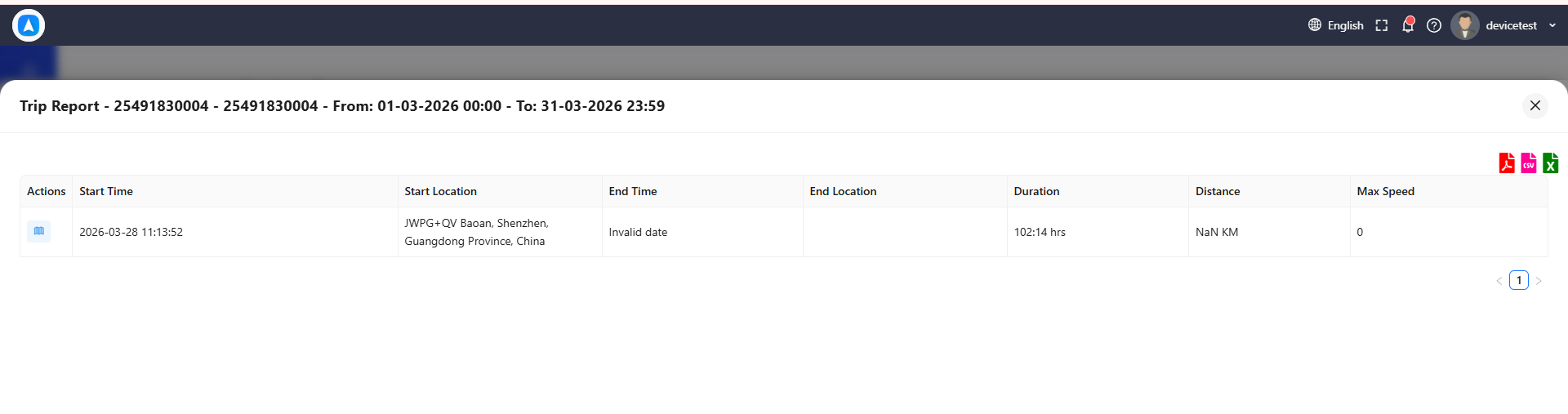
What the Report Shows
Each trip entry includes:
| Field | Description |
|---|---|
| Trip Number | Sequential trip number for the selected period |
| Start Time | Date and time the trip began |
| Start Location | Reverse-geocoded address of the trip origin |
| End Time | Date and time the trip ended |
| End Location | Reverse-geocoded address of the trip destination |
| Distance | Total distance traveled during the trip (km or miles) |
| Duration | Total elapsed time from start to end |
| Avg Speed | Average speed during the trip |
| Max Speed | Highest speed recorded during the trip |
Stops Between Trips
Between each trip entry, the report shows the stop duration -- the time the vehicle was stationary between the end of one trip and the start of the next. This helps identify:
- How long the vehicle spent at each destination
- Whether there were unexpected delays between trips
- Total idle/wait time throughout the day
Best For
- Understanding daily movement patterns -- See exactly where each vehicle went throughout the day.
- Verifying delivery routes -- Confirm that drivers followed planned routes and visited all scheduled stops.
- Driver accountability -- Match trip data against work orders or schedules to verify compliance.
Cross-reference the Trip Report with your dispatch schedule to identify missed stops or route deviations. Compare actual trip times against expected durations to spot inefficiencies.
How to Generate
- Go to Reports and select Trip Report.
- Choose a vehicle.
- Set the date range.
- Tap Generate.
The report loads as a scrollable table. Use the export buttons to download as PDF, Excel, or CSV.
A "trip" is defined as continuous movement between two stops that exceed the configured stop duration threshold. Very brief stops (e.g., at a traffic light) are not treated as trip boundaries.
If a GPS device loses signal during a trip (e.g., in a tunnel or parking garage), the trip may appear split into multiple segments. Check for very short gaps between consecutive trips that share similar locations.