Daily Travel Report
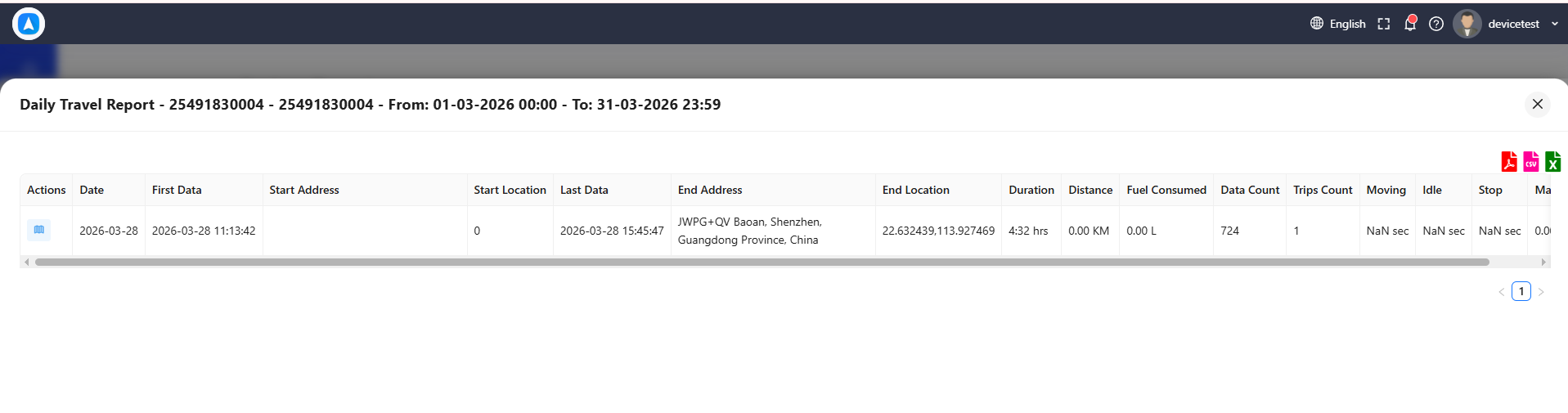
The Daily Travel Report provides a day-by-day summary of a vehicle's activity. Instead of listing every individual trip, it consolidates each day into a single row showing departure time, arrival time, total distance, and a breakdown of moving versus stopped time.
What the Report Shows
Each day's row includes:
| Field | Description |
|---|---|
| Date | The calendar date |
| First Departure | Time of the first trip start for the day |
| First Departure Location | Address where the day's first trip began |
| Last Arrival | Time of the last trip end for the day |
| Last Arrival Location | Address where the day's last trip ended |
| Total Distance | Combined distance of all trips for the day |
| Moving Time | Total time spent in motion |
| Stopped Time | Total time spent stationary |
| Number of Trips | Count of individual trips for the day |
Best For
- Daily fleet overview -- Quickly see which vehicles were active each day and how far they traveled.
- Attendance verification -- Confirm that vehicles (and their drivers) started and ended the day on schedule by checking first departure and last arrival times.
- Utilization analysis -- Compare moving time vs. stopped time across days to identify patterns or underutilization.
Look at the first departure and last arrival times to ensure drivers are starting on time and not finishing too early. Consistent late starts or early finishes may indicate scheduling issues.
How to Generate
- Go to Reports and select Daily Travel Report.
- Choose a vehicle.
- Select a date range (commonly a week or month).
- Tap Generate.
The report displays as a table with one row per day. Days with no vehicle activity will either be omitted or shown with zero values, depending on your account configuration.
The "First Departure" and "Last Arrival" correspond to the ignition-on and ignition-off events at the start and end of the day, respectively. If the vehicle was already in motion at midnight, the first recorded movement carries over.
Days where the vehicle never moved will show no departure or arrival data. This is normal for weekends, holidays, or vehicles that were not scheduled for use.