Fuel Summary Report
The Fuel Summary Report tracks daily fuel consumption, identifies refueling events and potential fuel theft or drain incidents, and correlates fuel usage with distance traveled. An interactive fuel chart provides a visual representation of fuel levels over time.
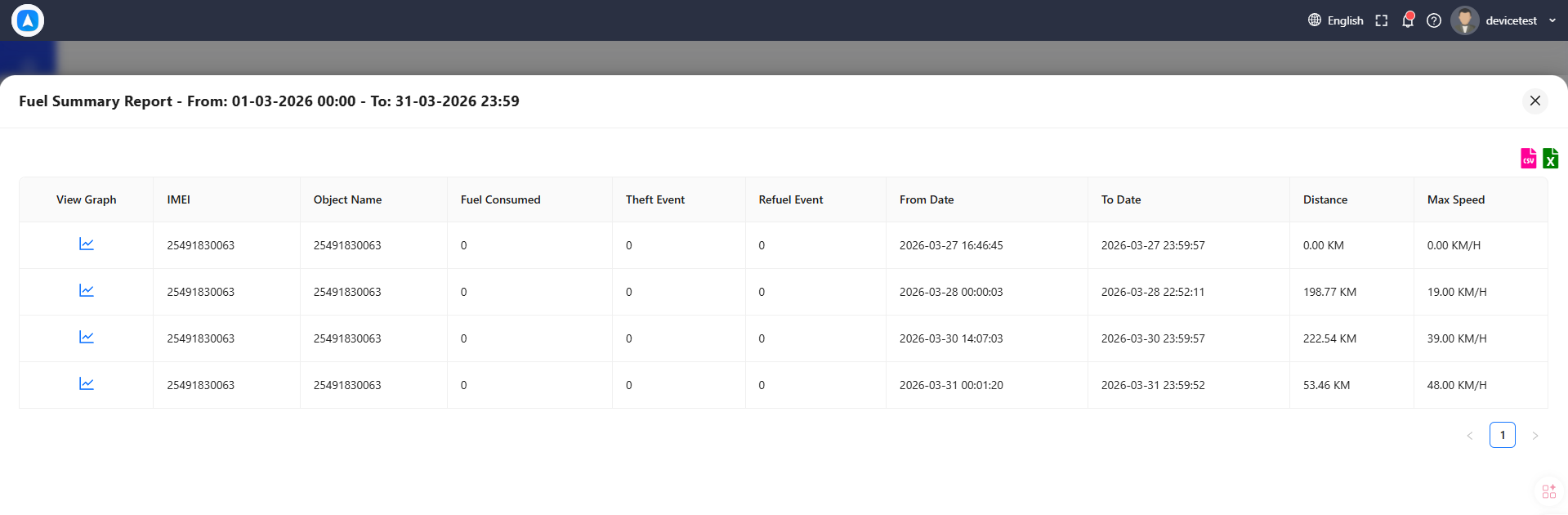
What the Report Shows
Each day's entry includes:
| Field | Description |
|---|---|
| Date | Calendar date |
| Start Fuel Level | Fuel level at the beginning of the day |
| End Fuel Level | Fuel level at the end of the day |
| Consumption | Total fuel consumed during the day |
| Refueled | Amount of fuel added (detected as a sharp increase in fuel level) |
| Drain / Theft | Fuel lost to suspected theft or unauthorized drain (sharp decrease while stationary) |
| Distance | Total distance traveled for the day |
| Fuel Efficiency | Consumption per distance unit (e.g., liters per 100 km) |
Interactive Fuel Chart
Tap or click any day's row in the report table to open a detailed fuel chart for that day. The chart plots fuel level over time and highlights:
- Gradual decrease -- Normal consumption during driving
- Sharp increase -- Refueling event (marked in green)
- Sharp decrease while stationary -- Potential fuel theft or drain (marked in red)
Use the fuel chart to pinpoint the exact time and location of refueling or drain events. Cross-reference with the vehicle's trip data to determine whether the vehicle was at a gas station or at an unexpected location.
Best For
- Fuel cost control -- Monitor daily consumption to identify vehicles with unusually high fuel usage.
- Theft detection -- Detect unauthorized fuel drains that occur when the vehicle is parked, especially overnight.
- Refueling verification -- Confirm that fuel purchases match actual fuel added to the vehicle.
- Efficiency benchmarking -- Compare fuel efficiency across vehicles to identify maintenance needs or driving behavior issues.
How to Generate
- Go to Reports and select Fuel Summary.
- Choose a vehicle (must have a fuel sensor installed).
- Select a date range.
- Tap Generate.
This report requires a fuel sensor connected to the GPS device. Vehicles without fuel sensors will show no data. Contact your hardware provider to install a fuel sensor if needed.
Fuel level readings can fluctuate slightly due to vehicle movement, road incline, and sensor precision. Small variations (under 2-3%) are normal and should not be treated as consumption or theft events.