Additional Reports (Web Only)
The following reports are available exclusively in the Traqcare web application. They cover specialized use cases including device health monitoring, wearable vitals, and detailed alert analytics.
These reports are only accessible from the web app. They are not currently available in the mobile application.
Available Reports
| Report | Description | Best For |
|---|---|---|
| Offline Objects | Lists all vehicles/devices that have been offline (no data received) beyond a configurable threshold. Shows last known location, last data timestamp, and offline duration. | Identifying devices that need maintenance, SIM issues, or power problems. Ensuring fleet data coverage. |
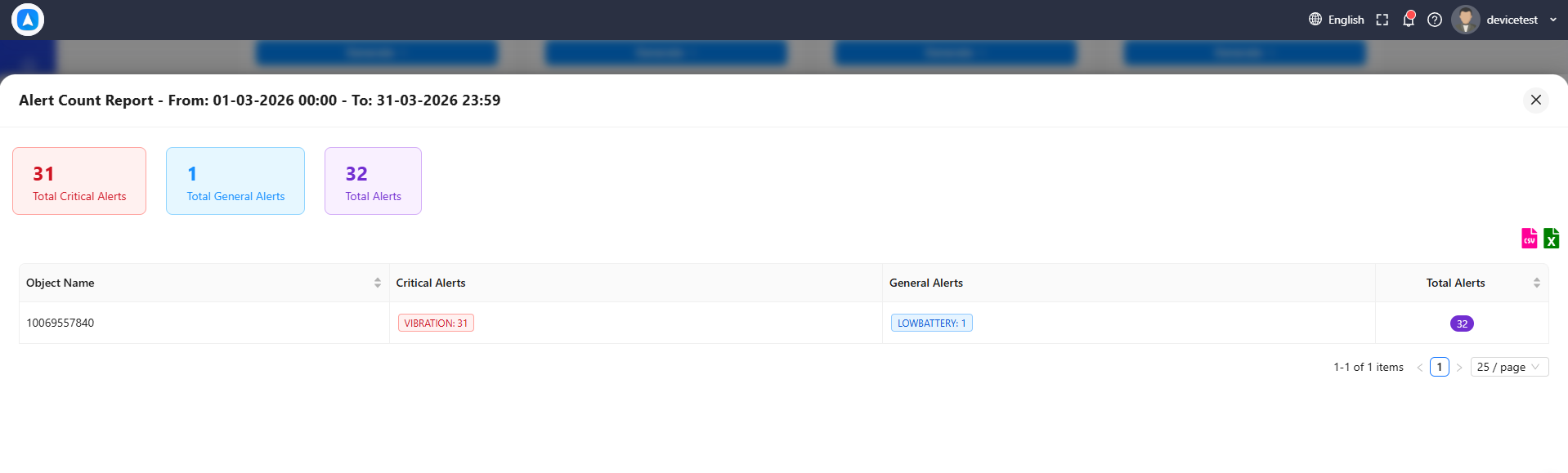
| Alert Count | Aggregated count of alerts by type and vehicle over the selected period. Displays totals in a matrix format with vehicles as rows and alert types as columns. | Quick identification of problematic vehicles or drivers. Spotting trends in alert frequency. Management dashboards. |
| Time Wise | Breaks down vehicle activity by hour of day, showing when vehicles are most active, idle, or stopped throughout a 24-hour period. | Optimizing shift schedules. Identifying off-hours usage. Understanding peak activity windows. |
| Health Based | Designed for wearable GPS devices that include biometric sensors. Reports heart rate, body temperature, blood pressure, and other vitals alongside location data. | Personal safety monitoring. Lone worker protection. Health compliance for field staff. |
| Voltage | Tracks the vehicle's battery voltage over time. Flags low voltage events that could indicate a failing battery or excessive parasitic drain. | Preventive maintenance. Detecting vehicles at risk of battery failure. Monitoring auxiliary power draw. |
| Battery Level | Monitors the GPS device's internal battery level over time. Useful for portable or battery-powered trackers that are not hardwired to the vehicle. | Ensuring portable tracker uptime. Scheduling recharges. Detecting devices at risk of going offline. |
How to Access
- Log in to the Traqcare web application.
- Navigate to Reports in the left sidebar.
- Scroll down past the standard reports to find the Additional Reports section.
- Select the desired report, choose your vehicle(s) and date range, and tap Generate.
Export
All additional reports support the same export options as standard reports:
- PDF for printable records
- Excel for further data analysis
- CSV for data integration
Use the Offline Objects report as a daily check to catch devices that have gone silent. Addressing offline devices promptly prevents gaps in your fleet tracking data.
The Health Based report requires specialized wearable GPS devices with biometric sensors. Standard vehicle GPS trackers do not provide health data. Contact your hardware provider for compatible wearable devices.