Sharing Live Location
Traqcare lets you generate a temporary, shareable link that displays a vehicle's live location on a map. The recipient does not need a Traqcare account -- they simply open the link in any web browser to see the vehicle's real-time position.
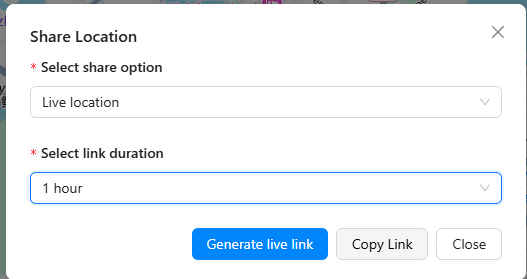
How to Share
- Navigate to the vehicle you want to share (via Map View, Object List, or Single Object Tracking).
- Tap or click the Share action button.
- Select a duration for how long the link should remain active.
- Tap Generate Link.
- Copy the link and send it via email, messaging app, or any other channel.
Duration Options
Choose how long the shared link stays active:
| Duration | Use Case |
|---|---|
| 1 hour | Quick check-in, short delivery window |
| 4 hours | Half-day monitoring, client delivery tracking |
| 8 hours | Full workday tracking |
| 24 hours | Overnight or next-day shipment tracking |
| Custom | Set a specific start and end time for the sharing window |
For recurring sharing needs, consider generating a new link each day rather than using very long durations. This keeps your sharing secure and time-limited.
What the Recipient Sees
When someone opens a shared link, they see:
- A clean map centered on the vehicle's live position
- The vehicle's current speed and direction
- The last-known address
- Real-time position updates (the marker moves as the vehicle moves)
The viewer does not see other vehicles in your fleet, historical data, or any account information.
Auto-Expiry
Every shared link expires automatically after the selected duration. Once expired, the link shows a message indicating that the tracking session has ended. There is no way for the recipient to extend the session -- a new link must be generated.
Anyone with the link can view the vehicle's live location. Treat shared links like passwords. Do not post them publicly. If a link is shared with the wrong person, you can revoke it from the sharing management screen before it expires.
Managing Shared Links
On the web app, you can view all currently active shared links and revoke any of them:
- Go to Live Tracking and select the vehicle.
- Open the Share action.
- View the list of active links with their expiry times.
- Click Revoke to immediately deactivate a link.
Revoking a link is instant. The recipient will no longer see live data, even if the original duration has not elapsed.