Search Nearby
The Search Nearby feature lets you find all tracked vehicles and Points of Interest (POIs) within a defined radius of any reference point — a vehicle, a POI, or any address on the map.
Web App Feature
Search Nearby is available in the Traqcare web application from the Live Tracking map controls.
How to Access
- Open Live Tracking from the left sidebar.
- In the map toolbar, click the Search Nearby (or Find Nearby) button.
- A dialog opens to select your reference point.
Choosing Your Reference Point
The feature supports three types of reference points:
| Reference Type | Description |
|---|---|
| Object | Choose one of your tracked vehicles as the center of the search. Uses the vehicle's current live location. |
| POI | Choose one of your saved Points of Interest as the search center. |
| Address | Type any address — results are geocoded in real time. Select from the autocomplete suggestions. |
How to Use
- Select Object, POI, or Address using the tab selector at the top of the dialog.
- Use the search box to find and select the specific item you want to use as your reference point.
- Click the selected item to proceed to the map view.
Viewing Nearby Results
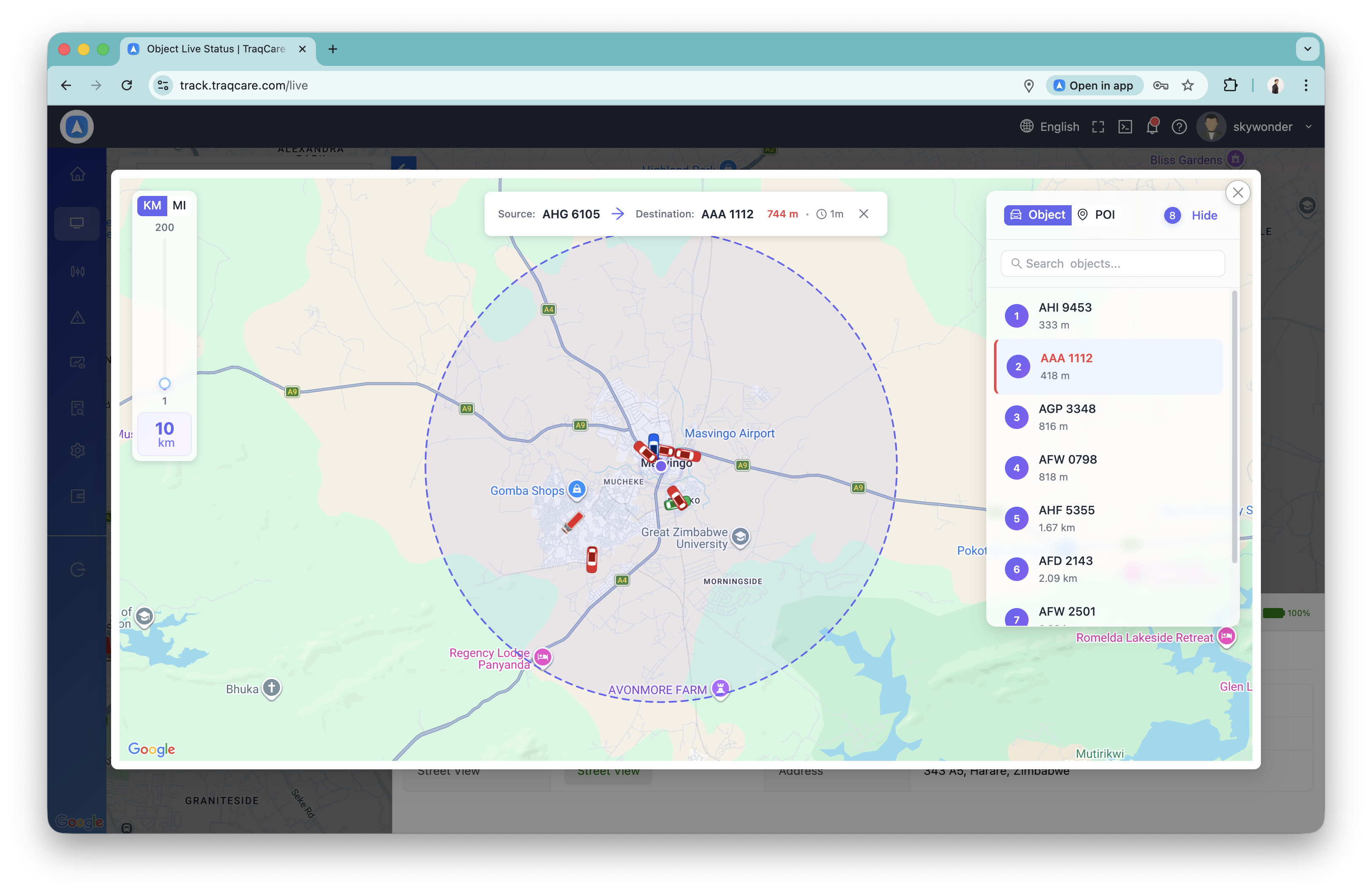
After selecting a reference point, a map opens showing:
- Your selected reference point at the center.
- A configurable radius circle around it.
- All tracked vehicles and POIs within the radius shown as markers.
You can adjust the radius to expand or narrow the search area.
Use Cases
| Scenario | How to Use |
|---|---|
| Find nearest available vehicle | Set a customer address as the reference point — instantly see which vehicles are closest. |
| Dispatch the closest driver | Search from a job site address to identify which driver can arrive soonest. |
| Check vehicles near a POI | Use a depot or fuel station as the reference to see which vehicles are currently nearby. |
| Fleet proximity audit | Use any vehicle as a reference to see if other fleet vehicles are in the same area. |
tip
Combine Search Nearby with the Object List to quickly identify and contact the driver of the nearest vehicle. Select the vehicle from the nearby results to open its full detail panel.